Python for Beginners 20: Dictionaries

This final lesson of the Python for Beginners series deals with another sequence-based data type: dictionaries. Allen B. Downey from Think Python even calls it “one of Python’s best features”.

Dictionaries are basically lists with the feature that each value is not referenced by an integer index, but by a key that can be of any (immutable) data type. As there is now a nearly infinite number of potential keys, we need to specify them when entering new values and each key must be associated with a single value. This association is called a key-value pair or sometimes an item. We say that each key “maps to” a value.

A dictionary is surrounded by squiggly brackets {}, with the individual key-value pairs being separated by commas, just like lists. Every key-value pair has a colon between the key and value. To create a new dictionary, you can just follow this syntax. Alternatively, you can create an empty one using the function dict() and then add items afterwards.

Adding items to a dictionary works just like replacing elements in a list:
myList[5] = ‘green’
myDict[‘one’] = ‘uno’

The difference is, of course, as previously mentioned, that you use a key instead of an index. What might be a bit surprising, is the fact that there is no fixed order in a dictionary. Every time you print it, the order may be different. However, as we use keys to reference the values, this does not constitute a problem.

Operations with sequence-based data types that work with dictionaries

  • the function len() returns the number of key-value pairs
  • the in operator returns True if something appears as a key in the dictionary
  • the function sorted() returns the key-value pairs in (numerical/alphabetical) order

Methods that only work with dictionaries

  • .get(key, default value): If the key appears in the dictionary, it returns the corresponding value; otherwise it returns the default value.
  • .values(): returns a collection of all the values that appear in a dictionary (you can combine it with the in operator to see whether something appears as a value in a dictionary)

When to use a dictionary?

Besides the obvious application (use a dictionary when you want to create a dictionary), there are some other cases when using the data type dictionary can be handy.

  • If you want to count several elements, for instance how often a letter appears within a sentence, you can create a dictionary with characters as keys and counters as the corresponding values.
  • Unlike lists, Python dictionaries use a data structure called a hashtable. Thus, whereas searching takes more and more time as lists grow longer, there is basically no change for dictionaries, independently from how many items they contain.
  • To improve the speed of your program, you can also store previously calculated values in dictionaries as memos.

If you want to learn more about dictionaries or about learning programming with Python, I recommend once again Allen B. Downey’s Think Python, which also inspired this post.
#mastery20

Python for Beginners 18: Lists and Tuples

In this lesson, we are going to transfer our knowledge on operations we can do with strings to new sequence-based data types, namely lists and tuples. Both are, like the name list indicates, an enumeration of elements.

Let’s look at an example for each of them:

  • To create a list, you can simply enclose the elements in square brackets ([]). You can also create an empty list without any elements using empty brackets, [].
    myFirstList = [a, 3, “red”]
  • A tuple (pronounced like it rhymes either with “supple” or with “quadruple”) does not require brackets, but may have a round brackets and it is going to be shown in round brackets when you print it.
    myFirstTuple = a, 3, “red” To create one with a single element, you have to include a final comma (to distinguish it from being a “normal”, non-sequential variable).

Overview of sequence-based data types: lists, tuples, strings

As the sequence-based data types can seem quite similar, it’s useful to compare them.

To break a string into individual letters and convert it into a list or a tuple, you can use the list or the tuple function, respectively.

Particularities of operations with lists and tuples

The 4 general operations mentioned in the lesson on strings also work for lists and tuples: You can access elements with the bracket operator, you can use the slice operator and you can do a traversal. However, there are some peculiarities.

For the relational operators there are two things to keep in mind:

  • With lists or tuples, bigger (>) and smaller (<) are considered as “bigger or equal” (>=) and “smaller or equal” (<=), respectively.
  • Subsequent elements in a position are not considered, i.e. if one list has a 1 as an element and the other list has 10 in the position, the result would be True, because Python considers the 1 as the first element of this position and ignores the subsequent 0.

useful methods for lists:

list methods:

  • lst.append() to add elements to the end of lst
  • lst.extend(lst2) to append all of the elements of lst2 to lst
  • lst.sort() arranges the elements of lst from low to high or in alphabetical order

Most list methods are void; they modify the list and return None. Thus, they are not valid for tuples, which cannot be modified.

string methods that involve lists:

  • string_name.split([delimiter]): converts a string into a list of words, the optional argument called a delimiter specifies which characters to use as word boundaries (default: blank space)
  • delimiter.join(list_name): takes a list of strings and concatenates the elements based on the delimiter

more useful functions

  • sum(lst) to add up the elements of a list (only possible if of the same type)
  • sorted(seq): takes a sequence and returns a new list with the same elements in sorted order
  • reversed(seq): takes a sequence and returns an iterator that traverses the list in reverse order

3 ways to delete elements from a list

  • lst.pop(index): deletes the element in the position of the index from the list and returns it → if you don’t indicate an index, the default is the last element
  • del lst[index]: deletes the element in the position of the index (or a slice of indices) from the list
  • lst.remove(element): deletes the element from the list and returns None

Which sequence to choose: lists vs. tuples?

As lists are mutable, they are more common than tuples. However, in some cases, it’s better to use tuples, for instance, because …

  • … tuple assignment makes it possible to swap the values of two variables without using a temporary variable or to use the split method to separate a sequence and assign the parts to a tuple
    a, b = b, a
  • … a function can only return one value, but it can be a tuple, so basically, it’s like returning multiple values

Example exercise

Create a program that asks the user for a certain amount of numbers (floating point). Store those numbers in a list. Show to the user the total, average and standard deviation of those numbers.
At the end, convert your list into a tuple.

This is what the result could look like.

If you want to learn more, I recommend once again Allen B. Downey’s Think Python, whose chapters on lists and tuples also inspired this post.

#mastery17

Python for Beginners 17: Strings

In this lesson, we are going to learn about strings. You might think that you already know everything about them, but this is certainly not true. So far, we know that input is automatically converted into strings if we don’t indicate otherwise and that we need to use quotation marks if we want to print strings. Maybe you even remember that to convert another data type into string, you can use the function str().

But there is much more we can do and it is important to know it, as strings are the data type to represent human language, so you are likely to get lots of input in this format and of course you are going to want to work with it. So read carefully the theory to be able to solve the mini-exercise at the end. Besides learning about strings, this lesson teaches you operations that are not only valid for strings, but also for other kinds of sequence-based data types. We are going to learn more about them in the next lesson.

Operations for sequence-based data types

  • built-in function len():returns the length of a sequence, i.e. the number of characters in a string or, more generally speaking, the number of elements in a sequence
  • the + operator to concatenate sequences: creates a new sequence by combining others
  • the * operator to repeat a sequence a given number of times
  • bracket operator to index an element: You can access individual elements using the index. An index is the number of the position of the element in a sequence.
    • To access it, you write the number of the position in square brackets [] after the list’s name.
    • You count the position starting from 0 for the first element – just like the range() function. For example, to access the fifth element, you write list_name[4].
    • The index needs to be an integer, but you can define it using numbers and variables.
    • You can also use negative indices. They will start counting from the end, for instance, the index -1 will show you the last element.
  • slice operator to select a segment of a string, i.e. a range of elements:
    • Just like when you access or select a character, you indicate the position of the first element you want to include and connect it with a colon to the position of the element after the last one that you want to include. Again, this is just like using the range() function.
      Example: myString[4:7] returns the part of the string called myString from the fifth character to the seventh character. You might think that this contradicts what I just explained (including the first, but excluding the last element), but remember that this is due to the way we count in programming, i.e. starting from 0.
    • If the first index is greater than or equal to the second the result is an empty string.
    • If you leave blank either the beginning or the end of the slice operator, Python replaces the missing value either by the first or the last position, respectively. Thus, if you leave blank both of them (string_name[:]), you get the whole string.
  • relational operators to compare two sequences: bigger (>), smaller (<) and equal (==) allow for comparisons and Python will return either a True or a False as a result.
    For sequences, the response is only True if it is true for all elements included in the comparison. For instance (0, 1, 2) < (1, 3, 4) would be True.
    For strings, bigger and smaller refers to the position of the word in the alphabet. A word that is considered “bigger” comes later in the alphabetical order. However, you need to be careful, as Python puts all the uppercase letters before all the lowercase letters.
  • traversal (= processing a sequence one element at a time):  Using a for or a while loop, a program starts from some point, selects each character in turn, does something to it, and continues until the end. This can be very useful, for instance if you want to count something and or spell a string.

Particularities of strings

  • immutable: You cannot change a string. Nevertheless, you can replace it with a string with the same name that contains the changed element. Basically, you cannot use the index operator to change an element, but you can construct a new string (even with the same name) using the slice operator. For instance, writing word = word[0:2] + “z” + word[3:] replaces the current position 2 (third letter) with a z.
  • string methods: For strings, you have the possibility to use in-built methods, similar to functions. Their syntax is different from functions, though: You write the name of your string followed by a point and then the name of the method ending with round brackets (). If the method requires additional information, you enter it as an argument in the brackets. With functions, we say that we are calling them and for methods, we are invoking the method on the string.
    Examples:
    • string_name.isupper(): returns true if all letters of the string are uppercase letters
    • string_name.upper() or string_name.capitalize(): converts all letters of the string into uppercase letters
    • string_name.find(‘letter’): searches for the letter or substring that you put as the first argument (needs to be inside single quotation marks) and returns the position where it (first) appears (additionally, you can determine the beginning and/or the end of the search by entering it as the second or third argument, respectively)
    • string1 in string2: The word in is a boolean operator that takes two strings and returns True if string1 appears as a substring in string2. You can also use this to define a function that tells you which letters appear in both strings.

Mini-Exercise: Ask your user to give you a random word.

  • What are two ways you could print ONLY the last letter of the word?
  • How would you print all letters (one per line)?
  • Count how many times a certain letter appears in the word.
  • Search a string for a particular letter: In which position does it appear for the first time? Find two ways to do it.
  • Bonus question: How could you reverse the letters, i.e. print the word starting with the last one (example: small → llams)? Hint: you can use this formula t = s[∷-1].

Your solution might look like this:

For more details and longer explanations you can look at Allen B. Downey’s Think Python, which also inspired this post. #mastery18

Python for Beginners 12: Nesting

This post’s heading may once again confuse you if you’re new to programming and/or not an English native speaker. It would not make sense for this series if we were going to talk about birds or pregnant women preparing for childbirth. Instead, we’re basically just going to continue the last lesson and learn about the nesting of conditional statements in Python.

In this context, nesting just means that you have one or more conditionals interwoven into one another. You can easily distinguish it from a list of ifs because a nested if is indented, i.e. the if itself is already indented. Therefore, you have to be very careful to still indent the instruction after the if and to not lose track of how many indentions you require.

Remember that indention errors were one of the three most frequent errors in conditionals? Do you know the other two? If not, I recommend you go back to the last lesson before trying the exercise.

If you are a very attentive reader, you may even remember the term nested from principle 5 of The Zen of Python, which states “Flat is better than nested.” This is actually quite obvious: As you can probably guess from all the talk about indention, nesting might make things confusing soon. So if you can separate the ifs in a way that makes sense and it is not much more work, avoid nesting.

After many exercises dealing with temperature conversion, it is time for a new topic. This time, we are going to write a program where clients can select the cheese for their pizza.

  1. First, you ask whether they want cheese.
  2. If yes – and only in this case, you give them the options mozzarella (1), gouda (2) and goat cheese (3). I recommend using numbers in brackets so your client can just type the number to select. If you want to use letters, you would have to use the data type string and it is more prone to mistakes as your client may just type capital letters, which Python would not recognize as correct.
  3. As output, you should repeat the client’s choice (e.g. You chose a pizza with gouda.).
  4. At the very end (outside of any if), you indicate the price. Each pizza costs USD 7, goat cheese costs USD 1 extra.

Of course, you could customize much more than just your cheese, but I didn’t want to make this exercise too difficult. If you want to, you can add some more ingredients.

Your result may look like this:

Congratulations, you have completed more than half of this Python for Beginners course! #mastery12

Python for Beginners 11: Conditionals

So far, we have covered the basics of how to write some simple code in sequential order. It is far more common, though, that you want your program to distinguish two or more alternatives. That’s when we need the so-called conditionals.

Just like in English, your condition starts with “if”, but unlike your normal phrases, this “if” needs to be followed by a variable and a comparative value, connected by an operator that describes the desired relationship. You may put the condition (without the if) into brackets. At the end, it is very important to put a colon.

Example for a condition:
in words:         if the variable a is bigger than 10
in Python:       if (a > 10):

In Python, it’s much shorter and thus more convenient.

Now comes the most difficult part: If you press enter, the curser automatically indents the following instructions. This is important. If you just copy something from somewhere else without indentation, Python won’t understand it and will display and error. Writing the instructions, i.e. what to do if the condition is true, is simple: It’s just your normal code.

Python also gives you the possibility to define instructions for the cases in which your conditions is not true. For this, you just write “else” at the same indentation level as your “if” and add a colon. You press enter and write your instruction in the next line. As “else” is the scenario in which your previous condition is not true, you don’t need to define any condition. Needless to say that you cannot use “else” if there is no previous “if”.

Some of you are probably now thinking, “That’s nice, but usually life is not black or white.” This is true, which is why Python has the option of adding one or more “elif” between “if” and “else”. What is “elif”? For once, this is not an actual English word, but a contraction between else and if. This explains also how it is used: It refers to a case in which your original condition (if) is not true (→ else), but you can define a new condition for your instruction (→ if). “elif” works just like “if”: you write your condition, possibly in brackets, and add the colon.

Before you try to write your first code with conditionals, one important piece of advice: Besides indention errors and missing brackets, most errors are due to users mistaking the assignation sign (=) for the equal sign (==). If your variable should be equal to a certain value, you must put ==. Otherwise Python won’t understand you.

Remember our favorite exercise on temperature conversion?

Now you can provide some additional information to the users: Let them know whether water boils at this temperature (under typical conditions).

Your code could look like this:

Of course, you could also leave out “elif” in this case, because we already have a validation since we define the user input as an integer. But as we’re still practicing, it’s nice to have all three options. #mastery11

Python for Beginners 10: Creating Modules

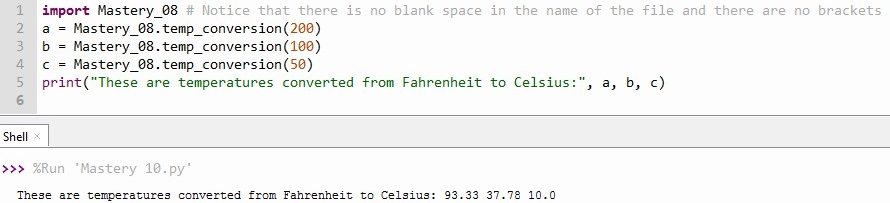
Since we already know how to use modules or libraries in Python3, we can create our own. Actually, this is very simple because you can import any file that contains Python code as a module. The only thing that you need to be aware of is the name of your file: It may not contain any blank spaces.

Since it is so basic, we can start away with practicing. Remember our typical example of the temperature conversion? We already created a function that can do this for us in lesson 8 so what we want to do now is import it and use it in a new file.

Two hints:

  • If you have forgotten how to import modules, you can go back to the last lesson.
  • If you get some seemingly strange output, go back to the file you imported. If you print something in this file you imported, it will also be printed in your new file, thus adding some unforeseen output.


Your result may look like this:

Finally, you should also consider that Python does not re-read a file if you have already imported it. So if you make changes in a file and want to use it imported in another one, you have to restart the execution, i.e. just run the program again.

Like in some previous lessons, I recommend looking at Think Python by Allen B. Downey for more detailed information. It was also the inspiration for this post.

Congratulations! You have already completed 10 lessons! #mastery10

Python for Beginners 09: Importing Modules

In the previous lessons, we learnt how to use functions and how to create them. In Python, you also have the possibility to use functions that other people have created already. Just importing these modules or libraries, as they are called, might save you lots of time. So before you start writing a complicated function, you search on the Internet. It is very likely that you are going to find something.

Once you found the name of the library, you just write “import “ (one blank space) and then the name of the module or library you want to import. When wanting to access a particular function, you write the name of the library followed by a point and then the name of the function.

If you want to generate random integers between 1 and 100, you can import the random library and use its function randInt(). Your code might look like this:

What function would you like to have? See if you can find it on the Internet. #mastery09

Python for Beginners 08: Creating Functions

Knowing how functions work, we are now going to create one on our own. Maybe you remember that in a previous exercise, we converted temperatures from Fahrenheit into Celsius and rounded the result to two decimals.

Imagine you would need to do this many, many times so you would want to find a way to automate it. You could create a function.

There are 6 steps to create a function:

  1. Let Python know you are going to define a function by writing def.
  2. Give your function a name (to call it later on) and write it behind def (one blank space in between). In our example, I call my function temp_conversion. The rules for naming functions are the same as for variables: the first character can’t be a number; it cannot be a keyword (a word that is already defined in Python). A function should also not have the same name as a variable.
  3. Define the argument. Write two brackets (directly after the name) and put the names of the variable(s) you want to have as argument(s) inside. If you have more than one, you need to separate it by commas (and a blank space after it). You can also leave it blank. temp_conversion only has one argument, the temperature in degrees Fahrenheit represented by the variable F.
  4. Finish the so-called header (first line of a function) by writing a colon after the final bracket of the argument.
  5. The rest of the function, called the body, has to be indented. Then you can define the steps you want your function to implement. My new function temp_conversion should define the temperature in degrees Celsius using a variable C and the conversion formula (I just copied it from the conversion we did before). Afterwards, it should round it to two decimals (again, just copied from before).
  6. At the end, you need to define what your function is supposed to return by writing it inside the brackets of the return function. In the example, I just put C.

Now that we have defined the function, we can call it. Remember that we do this by just writing the name with values for the arguments in brackets. Here, I put 200 as the value for F.

Don’t worry if you still see no result in the console. As always, you need to print the function or a variable to which you have assigned the return value of your function in order to see any results.

One final piece of advice: The function only works as long as you do not create another function with the same name. As Python can only remember one function per name, it will just use the one most recently executed and forget the other one. You should be able to avoid this by giving meaningful names to your functions. However, what is useful to know is that Python does not consider the names to be identical if the functions have different numbers of arguments, i.e. you can have multiple functions with the same name as long as they have a different number of arguments.

Like some previous posts, this one was inspired by Think Python by Allen B. Downey. If you want a more complete approach to learning Python (including all the theory), you can have a look at the free pdf version.

#mastery08

Python for Beginners 07: Calling Functions

If you’re completely new to programming, you might not understand the heading: What is “calling functions” supposed to mean? Actually, “calling” is just a technical term for “using“ here. You can think of the existing functions as being dormant somewhere in the memory of the program or in a library. If you want to use them, you need to call them so they appear.

In fact, this lesson is basically just a revision with a more detailed look on a topic you already know, like the previous ones on output and user input. We have used several functions before, for instance print(), input() or type(), but this time we are going to focus on the terminology.

  • When we refer to functions, we say their name, for example print, input or type. Be aware that capital letters matter and change the name.
  • You probably remember from my way of writing functions that they are followed by brackets. What is inside, is called the argument. Depending on the function, it can be one or several variables.
  • What do functions do? Functions take an argument, implement a series of operations and return a result. This is why the result is also called return value.

Time to practice: Use at least 5 functions in Thonny and indicate the name, argument(s) and return value in comments. Hint: I’ve already mentioned three functions above and in the post on data types, you can find some more.

Be aware that only the function print() generates an output, i.e. you can see the return value when you execute the program. For all the other functions, you need to assign them to a variable and then print it in order to see the return value in the console.

This post is based on Chapter 3 of Think Python by Allen B. Downey.

#mastery07

Python for Beginners 05: Basic Output

In this post, we are going to explain something that we have used already in more detail. You already know that to produce output you need to use the function print() from the previous lessons.

How to use the function print():

You can print a variable by just putting its name in the brackets of the print() function, but if you want to write text as output, you have to write the text inside quotation marks “” inside the brackets.

  • If you want to combine different elements, you have to use a comma in between.
  • If you want to combine strings, you can use a + plus. In this case, you have to add a blank space before the second string to create a separation.

Remember: Capital letters make a difference so never write print() with a capital P.

How to format the output:

Since there are so many ways to format your output, I recommend you just search on the Internet for whatever you need. For now, there are three frequent examples

  • By default, there is just a blank space between the different elements in a print(). You can replace the blank spaces by commas by adding sep=”,” before closing the bracket of the print function. Of course, you can just modify it by substituting the comma by a point or any other symbol or text you want.
  • If you want spread your text over multiple lines, you add a backslash followed the letter n (\n) between the words you want to separate.
  • To shorten the amount of digits displayed for a float number, you put ‘%.2f’% (“apostrophe + % + . + number of digits displayed + f + %”) in front of the variable. Here, the number 2 indicates that you only want two digits, but of course you can modify it. Alternative you can use the function round(), but this affects the value of the variable for future operations, whereas formatting only changes the visual appearance of the output.

To practice your newly acquired knowledge (#mastery05), look at the next lesson on basic user input where there is going to be an exercise that includes both output and input.